aimux: A Control Plane for AI Agent Swarms
When you're running multiple AI coding agents across terminals, you lose track of what each one is doing. aimux multiplexes them into a single dashboard with full visibility, trace inspection, annotation for evaluation, and now infrastructure support for scaling agents to Kubernetes.
github.com/zanetworker/aimux - source code, install instructions, and docs.
The problem
Claude Code is refactoring auth in one terminal. Codex is rewriting tests in another. Gemini is generating docs in a third. A fourth session is idle. A fifth is stuck on a permission prompt. You don’t know, because each one lives in its own tab with its own logs and its own trace format.
The agents themselves have gotten pretty good. Knowing what five of them are doing at the same time? Not so much.
A fair question at this point: why would you run multiple coding assistants at the same time? Two reasons. First, it’s not always different agents. Most of the time it’s multiple instances of the same one. Three Claude Code sessions across three projects, each doing its own thing. Second, different agents are genuinely better at different tasks. I use Codex to peer-review Claude’s output sometimes, or run the same task on both to compare. Gemini handles certain writing tasks differently. It’s less about brand loyalty and more about using whatever works for the job at hand.
I kept hitting the visibility problem while doing this. Tab-switching to check status, grepping through JSONL logs to figure out what happened three turns ago, forgetting which agent was blocked on what. It felt like running a bunch of microservices with no observability layer.
What aimux does
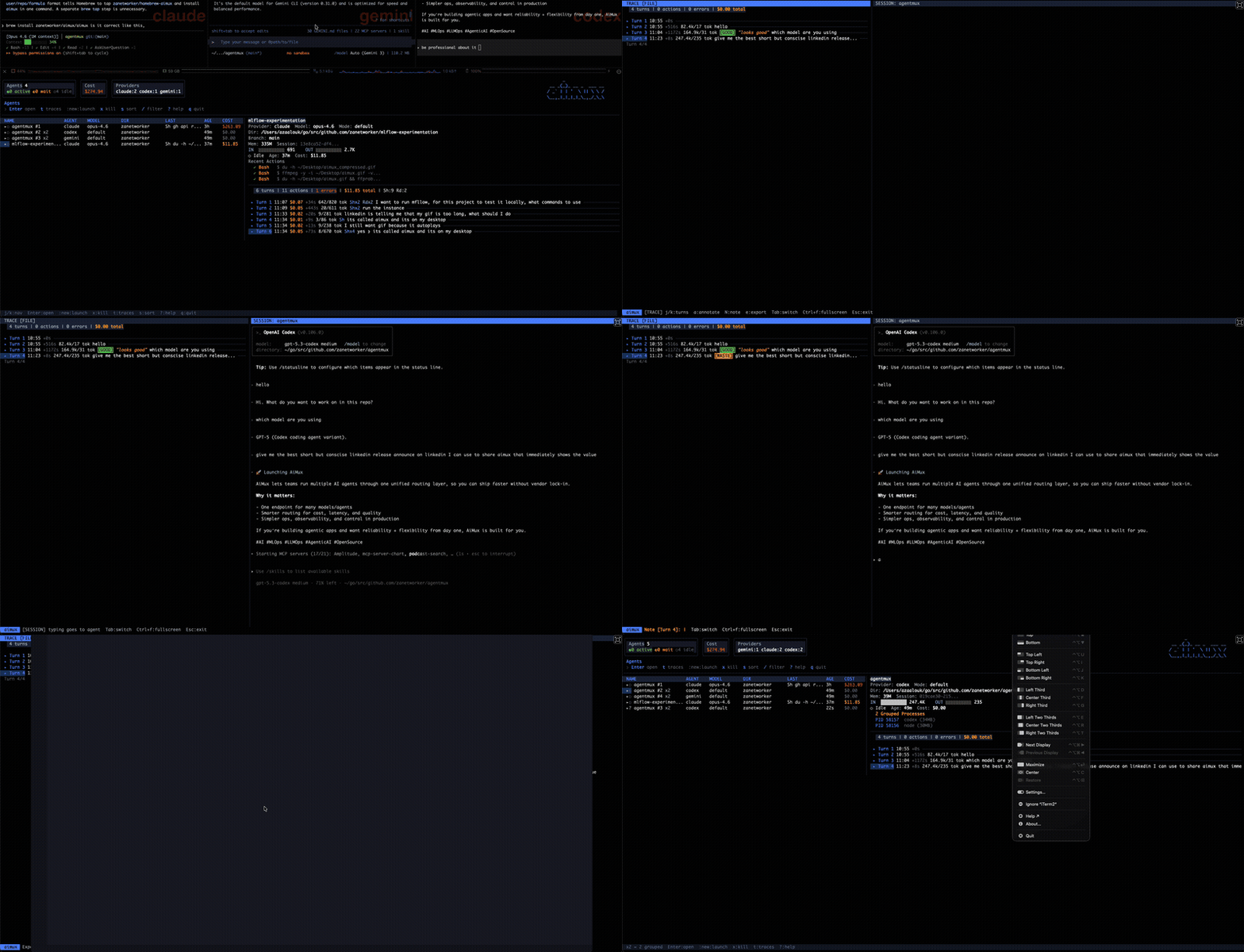
aimux is a terminal multiplexer for AI coding agents. One Go binary, no daemon, no browser. Run it and you get a live dashboard of every running agent across providers (Claude Code, Codex, Gemini CLI) with status, model, token count, cost, and working directory. It polls the process table and session files every two seconds.
Press Enter on any agent and you get a split view: conversation trace on the left, interactive session on the right. You can read through the full turn-by-turn history (prompts, responses, tool calls with success/failure) while the agent keeps working next to it.
Discovery without hooks
aimux doesn’t need plugins or modifications to your agent tools. It finds running agents by scanning processes (ps aux), walking the PPID chain to catch subagents, and matching session files to processes by comparing start times with log timestamps. It reads Claude’s JSONL, Codex’s conversation files, and Gemini’s JSON traces, then normalizes them into one format.
If one provider fails (say your Gemini setup is broken), the others still show up. Failures are isolated.
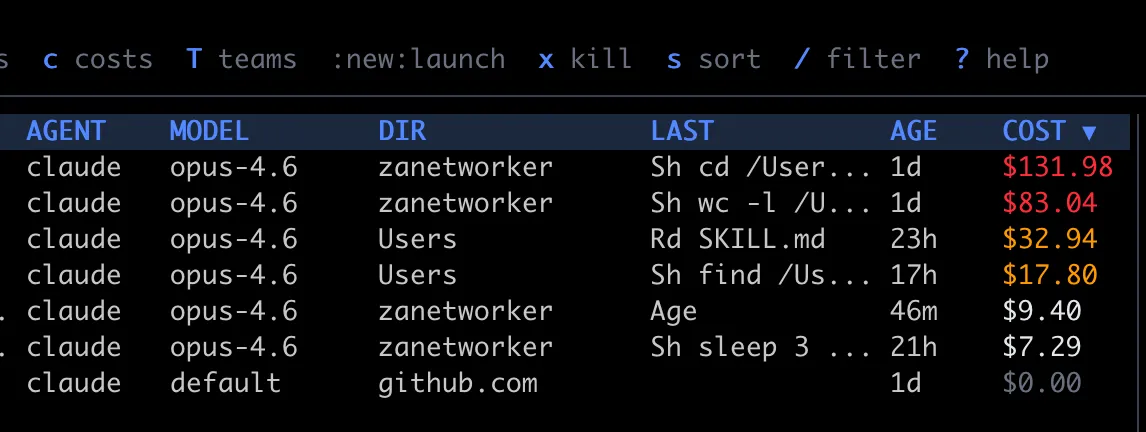
When an agent spawns subprocesses (Claude Code’s node subagents, for example), aimux groups them. The parent row shows a ×3 badge, and you can expand to see individual child PIDs with box-drawing glyphs. Status icons tell you at a glance what’s happening: green dot for active (activity in the last 30 seconds), hollow dot for idle (waiting for input), half-filled for waiting on a permission prompt.
Subagent tracking is now provider-agnostic. Whether Claude spawns a node subprocess or Gemini launches a child task, aimux uses the same ancestor-chain walk to identify and group them. The identity tracking doesn’t depend on any provider-specific convention — it works purely from the process tree.
Cost tracking
Every agent in the dashboard shows its estimated cost. aimux calculates this from token counts and model pricing at discovery time, so the number is always there and updates every two seconds.
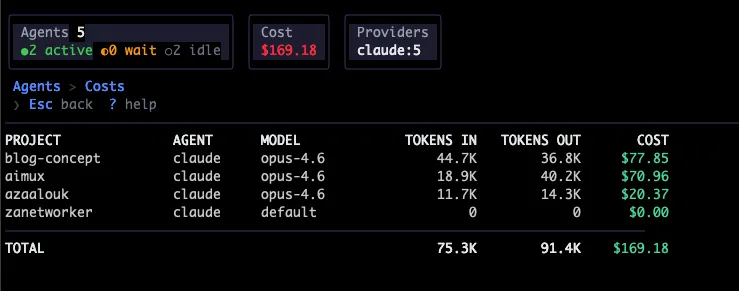
The :costs command opens a dedicated cost dashboard that aggregates spending by project. It shows project name, provider, model, tokens in, tokens out, and estimated USD for each, sorted most expensive first, with a total at the bottom. Costs are color-coded: gray for zero, white under $10, yellow under $50, red above. Per-turn cost also shows up in the trace view, so you can see which individual turns burned money (usually the ones with large context or long tool-call chains).
This came from a real annoyance: running five agents for a day and having no idea what the bill looked like until I checked the API dashboard. Now I just hit :costs and see it broken down by project.
Spawning new agents
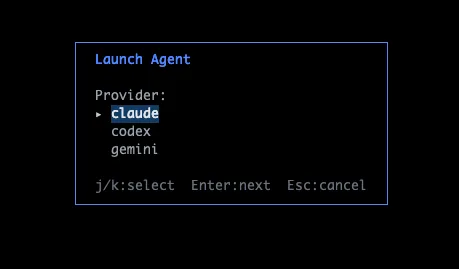
Type :new and aimux opens a launcher overlay. You pick a provider (Claude, Codex, etc.), then a project directory (from a list of recent directories or a file browser), then configure the model, permission mode, and runtime (tmux or iTerm). There’s also a toggle to enable OTEL tracing on the spawned session, which auto-injects the OTEL_EXPORTER_OTLP_ENDPOINT env var so telemetry flows into aimux’s receiver.
The point is to stay in one place. Instead of opening a new terminal, cd-ing to a project, running claude --model opus, and hoping you remember to check back, you just launch from aimux and the new agent shows up in the same dashboard. The flow walks you through each step:
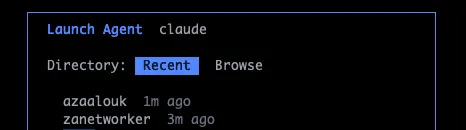
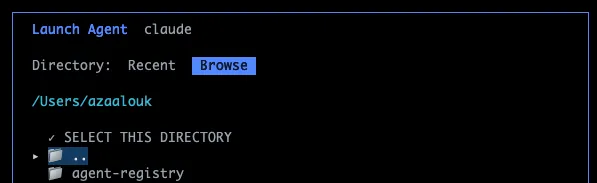
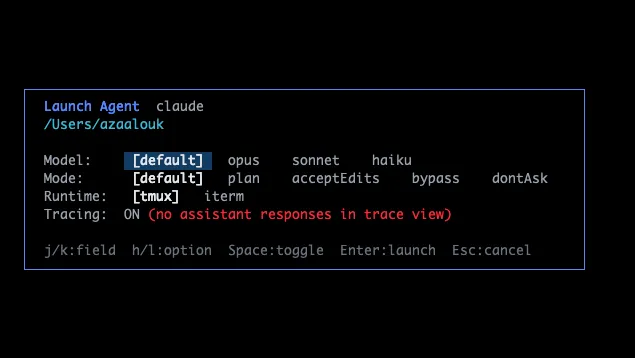
Recent directories are pulled from each provider’s history, so the dirs you’ve been working in are already there.
You can also launch from the CLI directly without opening the full TUI. aimux spawn lets you pick a provider, directory, and model from the terminal and drop into a session immediately. aimux resume lists your recent sessions and lets you pick one to jump back into. These subcommands are useful when you know exactly what you want and don’t need the full dashboard.
Agent lifecycle
You can kill agents directly from the dashboard with x (confirmation prompt first). Sort the agent list by name, cost, age, model, or PID with s — useful when you want to see which sessions are burning the most money or which ones have been idle the longest. Filter by name, directory, or model with / to narrow down a crowded list. Jump to top or bottom with g/G.
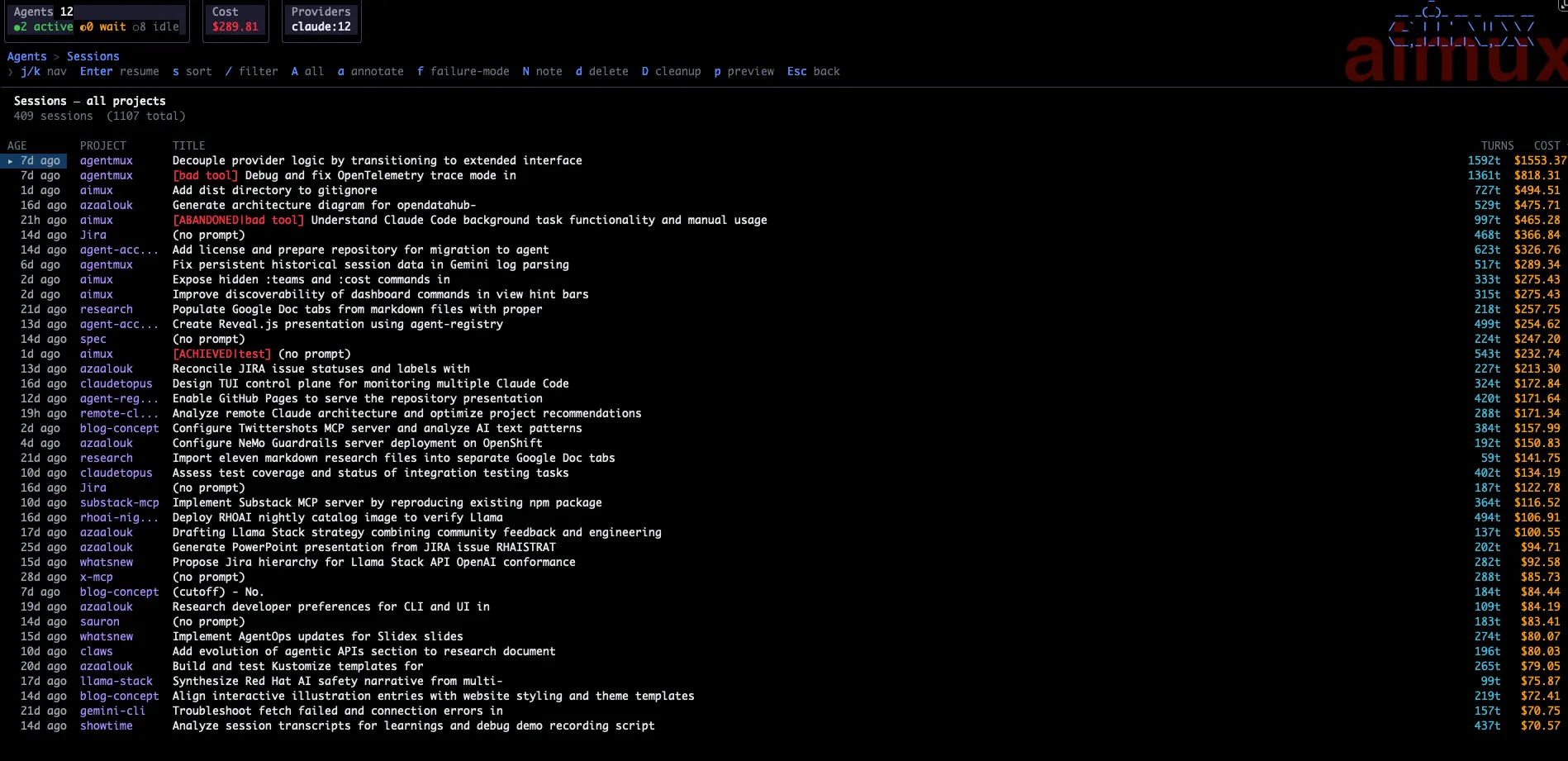
The sessions view got a significant overhaul. Each session now shows cost alongside token counts, last activity, and working directory in a wider column layout. Sessions sort by most recent by default, with the same s cycling available for cost and age. Scroll through long session lists without losing your place, and delete sessions you no longer need directly from the view.
Session titles are generated automatically using an LLM (Gemini 3 Flash) that reads the opening prompt and produces a short human-readable label. Instead of seeing a truncated JSONL path or a raw timestamp, you get something like “refactor auth module” or “generate API docs for payments service”. Titles are cached so they don’t regenerate on every poll. If title generation fails for a session, aimux falls back to the directory name quietly — no error, no gap in the list.
Session history browser
Not every interesting session is one that’s currently running. aimux now has a session history browser (:history or h from the agent list) that shows all past sessions across providers — completed, killed, or just closed. Each entry shows the LLM-generated title, provider, model, working directory, and when the session ended.
From the history browser you can open any past session’s trace to read through what happened, resume a session (which re-launches the agent in the same directory with the same provider), or delete sessions you no longer want. Annotations you added to a session are preserved and visible even after the agent process is gone.
This made a difference for how I use aimux day-to-day. When a session finished three hours ago and I want to know what it actually did, I don’t need to find the JSONL file and grep through it. I just open history, find the session by title, and read the trace.
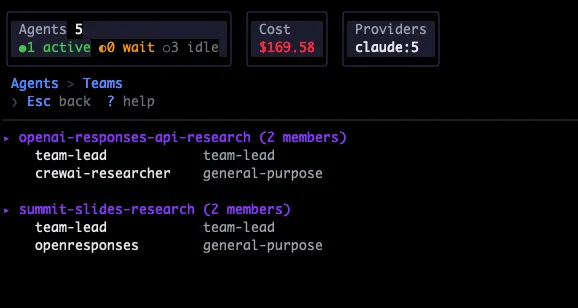
There’s also a :teams view that reads Claude Code’s team configurations from ~/.claude/teams/ and shows team members, useful when running multi-agent team sessions.
The provider interface
Each agent type implements a Go interface with 11 methods. Want to add aider or Cursor’s CLI? One file, register it, done. Session rendering is a separate SessionBackend abstraction: Claude embeds directly via PTY, Codex and Gemini mirror their tmux sessions.
For infrastructure providers (K8s, EC2, SSH), there’s InfraProvider, which extends the base with health checks, session spawning, task management, and workload scaling. The two-layer health model (coordination + compute) maps to any backend: Redis + K8s API, SQS + EC2 API, or whatever your infrastructure looks like.
Tracing, evals, and debugging
This is really the part that made me want to build aimux. Running agents is easy. Understanding what they did, and whether it was any good, is the hard part.
Markdown rendering in the trace view
Agent responses often contain markdown — code blocks, headers, bullet lists. Previously these rendered as raw text, which was readable but not great for long responses with structure. The trace view now renders markdown properly: code blocks with syntax highlighting, bold and italic text, headers with visual hierarchy. It makes a real difference when an agent returns a multi-section analysis or a code snippet with an explanation around it.
Two trace sources, one view
aimux pulls trace data from two places simultaneously. First, it reads each provider’s native log files: Claude Code’s JSONL, Codex’s conversation files, Gemini’s JSON traces. These give you the full conversation: what the user asked, what the agent said, every tool call with its input and whether it succeeded or failed. Each turn is a Turn struct with user lines, output lines, a list of ToolSpan actions, token counts, cost, and model name.
Second, aimux runs an OpenTelemetry HTTP receiver on port 4318. When you spawn agents through aimux, it automatically sets the OTEL_EXPORTER_OTLP_ENDPOINT env var so agents send telemetry to aimux’s receiver. Claude Code sends events via the OTEL logs protocol (user_prompt, api_request, tool_result), and aimux converts them into its internal span model. This gives you live cost updates and token counts without waiting for log files to flush.
The combination matters: file parsing for rich conversation content, OTEL for real-time visibility. You get both in the same trace view.
Annotations as evaluation data
While reading through a trace, press a to cycle a turn’s label through GOOD, BAD, WASTE, or clear. Press N to attach a free-text note explaining why. Annotations are saved as JSONL under ~/.aimux/evaluations/, one file per session.

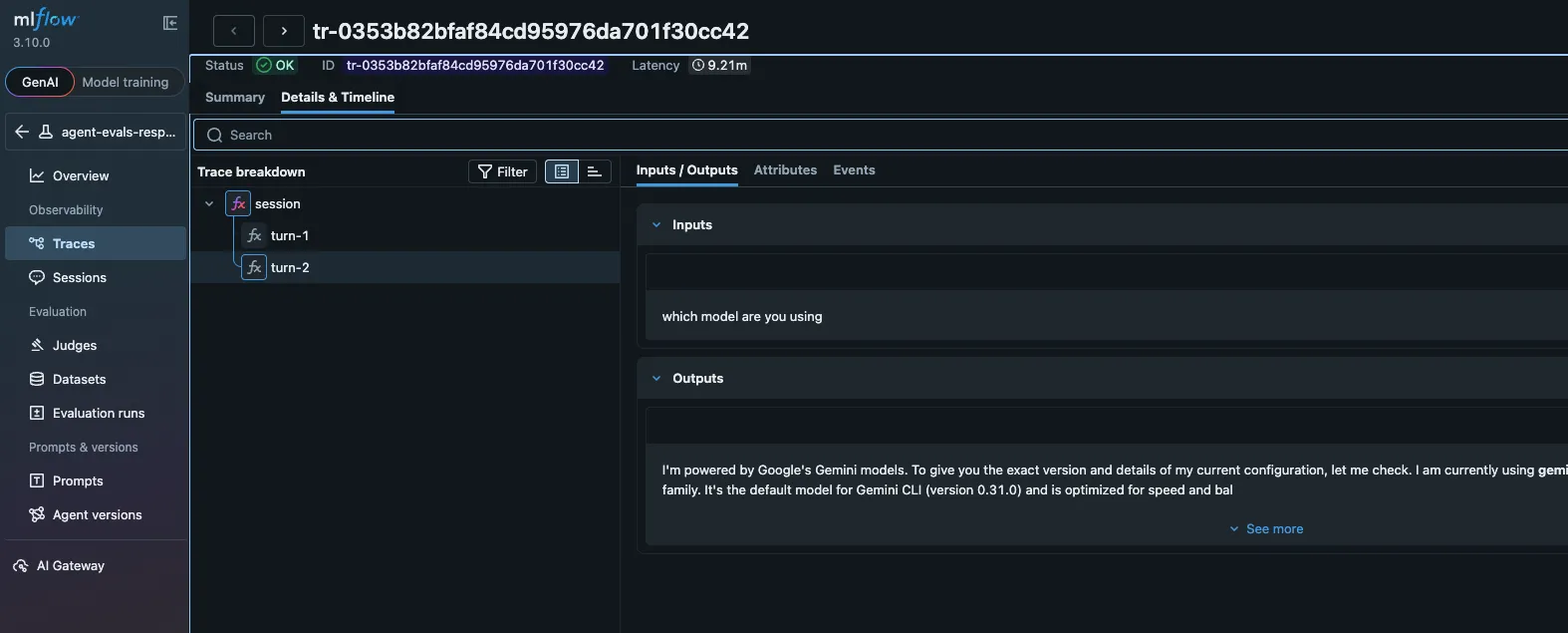
This is where it connects to MLflow. Run :export-otel and aimux constructs a proper OTLP trace: a root session span, child spans for each turn, grandchild spans for each tool call. Annotations become span attributes (aimux.feedback.value, aimux.feedback.rationale). The whole thing ships to whatever OTLP endpoint you’ve configured in ~/.aimux/config.yaml, whether that’s MLflow, Jaeger, or Grafana Tempo.
# ~/.aimux/config.yaml
export:
  endpoint: "localhost:5000"
  insecure: true
  experiment_id: "123"  # MLflow experiment
Once in MLflow, you can select annotated traces, add them to an evaluation dataset, and use them as ground truth to calibrate LLM judges. Run the same task on Opus vs. Sonnet, annotate both, export both, compare BAD rates and cost. The traces carry model name, token counts, and cost, so the comparison is apples-to-apples.
Debugging the pipeline
aimux exposes a /debug endpoint on the OTEL receiver (curl http://localhost:4318/debug). It shows you how many trace and log requests came in, which conversation IDs are stored, and a rolling log of the last 50 HTTP requests. Add ?events=1 to dump all stored spans with their attributes. When an agent’s telemetry isn’t showing up, this is how you figure out why.
There’s also the JSONL export path (e then j in the trace view), which writes enriched turns to ~/.aimux/exports/. Each line is a full ExportTurn with input, output, tool actions, tokens, cost, duration, and any annotation label/note. You can grep through these files, load them in Python, or pipe them into whatever analysis you need.
Your laptop is a startup. Your cluster is the enterprise.
Here’s the thing I keep running into. I have five agents running across three projects. My fan sounds like a jet engine. My battery is at 12%. And one of the agents needs to do a full codebase scan that’ll take 40 minutes.
Your laptop is a startup. It’s scrappy, it’s fast, everything is right there. But startups hit walls. You run out of memory. You run out of cores. You close your lid and everything dies. You can’t run agents overnight. You can’t share infrastructure with your team.
At some point, every startup either stays small or grows into something bigger. For AI agents, “something bigger” is your cloud infrastructure. K8s, EC2, whatever you have. The agents that need more room move there. The ones that need your attention stay local.
This isn’t hypothetical. I hit the ceiling running research agents alongside coding agents. The research agent was doing web searches and document processing while the coding agent was running tests. My 2023 MacBook Pro was genuinely struggling. Moving the research agent to a K8s pod with 4GB of memory and dedicated CPU solved it. The coding agent stayed local because I needed to interact with it constantly.
That’s what aimux v0.7.0 is about. The same dashboard, the same trace view, the same annotation workflow. But now your agents can run wherever makes sense.
Three modes
I ended up with three session modes, each matching a real workflow I use:
Local is what aimux always did. Agents run on your machine, aimux watches them.
Hybrid is where it gets interesting. Claude runs on your laptop and acts as the lead. When it needs to dispatch work (code review, research, test generation), it uses an MCP server to spawn worker agents on Kubernetes pods. Claude doesn’t know or care that the workers are remote. The MCP server makes K8s tasks look like native Claude tasks.
Remote is full delegation. An entire Claude Code instance runs inside a K8s pod. You attach to it through aimux’s TUI the same way you’d attach to a local session, type commands, read output, switch between trace and session panes. When you detach, the pod keeps running.
Zero-setup K8s
I wanted the infrastructure setup to be almost nothing. Point aimux at a running cluster and go. No kubectl apply, no manual secret creation, no namespace setup.
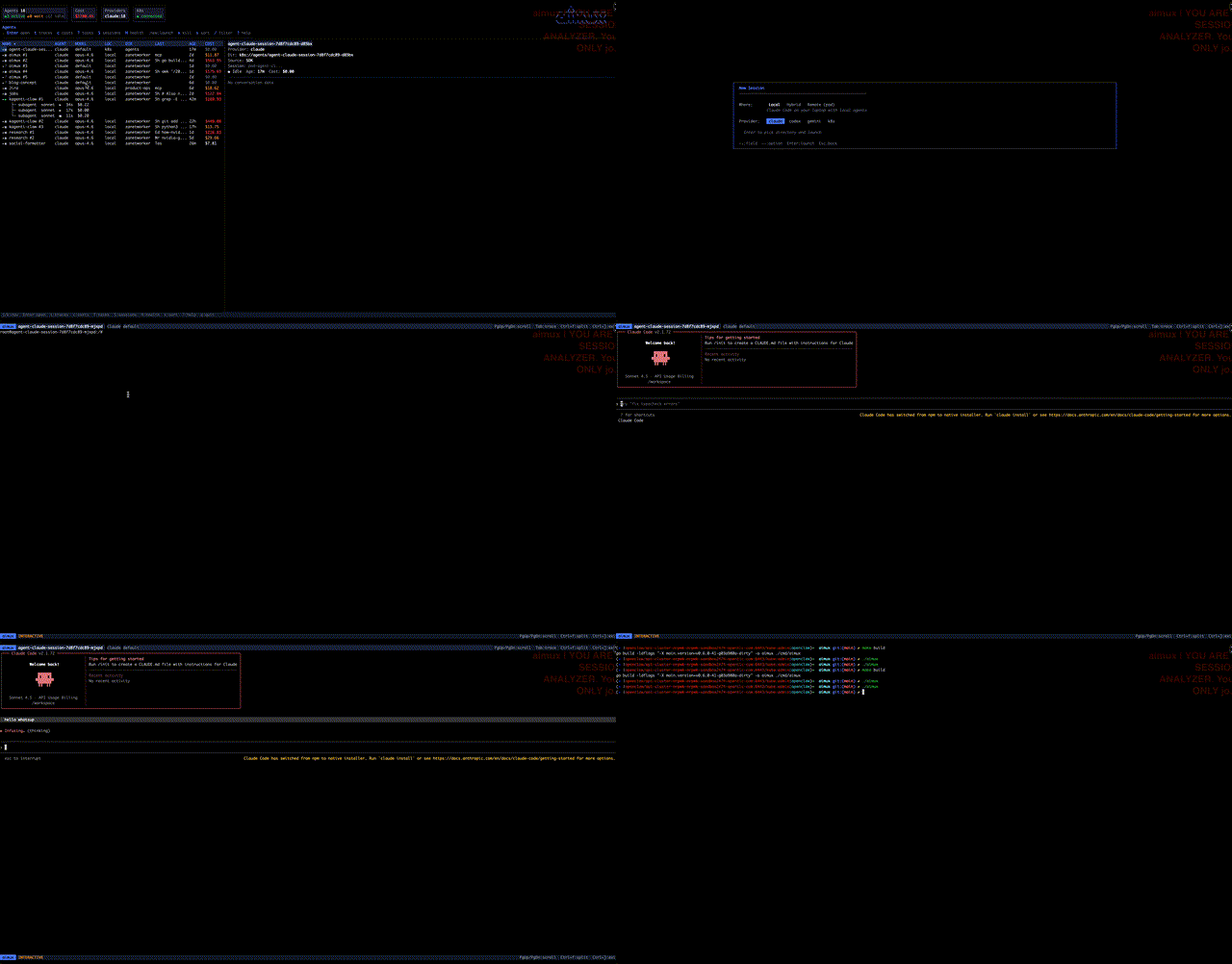
When you spawn your first remote session, aimux checks if the namespace exists and creates it if not. It reads your local auth (Vertex AI credentials, API key, or both) and creates K8s secrets from them. It builds the deployment spec on the fly, scales it up, waits for the pod, and attaches. The whole flow is: :new, pick Remote, pick claude, wait a few seconds, start typing.
For auth, aimux supports both Vertex AI (mounting your GCP Application Default Credentials into the pod) and Anthropic API keys. If you have CLAUDE_CODE_USE_VERTEX and CLOUD_ML_REGION set locally, aimux forwards them to the pod at attach time.
System health
Press H or :health and you get a unified status dashboard. It checks every provider: is the binary installed, what version, how many agents are running. For infrastructure providers, it probes the coordination layer (Redis) and compute layer (K8s API) and lists discovered workloads.
System Health

  Local Providers
    claude      ✓  /opt/homebrew/bin/claude v2.1.72    3 active
    codex       ✗  not installed
    gemini      ✓  /opt/homebrew/bin/gemini v1.0.4     0 agents

  Infrastructure (k8s)
    Coordination:   ✓ connected
    Compute:        ✓ connected  2 workloads
      - agent-claude-session
      - agent-claude-task
The health data model is generic. Coordination + compute maps to any backend. When someone writes an EC2 or SSH provider, the same dashboard works without changes.
Tasks view
Press T for background tasks dispatched to infrastructure. Each task shows its status, provider, age, and result. Tasks are fire-and-forget: you submit a prompt, it runs on a pod, you check back later. The tasks view refreshes when you’re looking at it and stays quiet otherwise.
The containers parallel
Containers were fine on their own. Then someone ran 12 of them and needed to know which ones were healthy, which were burning CPU, and which had crashed at 3am. The answer was orchestration. Not because containers got worse, but because running a lot of them is a different problem than running one.
We’re at the same inflection with AI agents. One agent in one terminal is manageable. Five across three projects is already hard to track. Ten, some local, some remote, doing different things on different schedules? That’s an orchestration problem.
And like containers, the answer isn’t “use fewer agents.” It’s better tooling. Something that shows you what’s running, what it’s doing, what it costs, and where it should run. Your laptop for interactive work. Your cluster for the heavy lifting. Same interface for both.
aimux is what I built for that. Single binary, works with agents you already run, nothing to install on their side. As of v0.7.0, your agents can run on your laptop, your K8s cluster, or both at the same time.
github.com/zanetworker/aimux - install with
brew install zanetworker/tap/aimuxor build from source.